
One form for anything you sell.
Products, fees or donations: build a form, share the link, and every payment lands in Transactions with a receipt to the buyer. No website needed.
Made for Malaysia's micro SMEs.
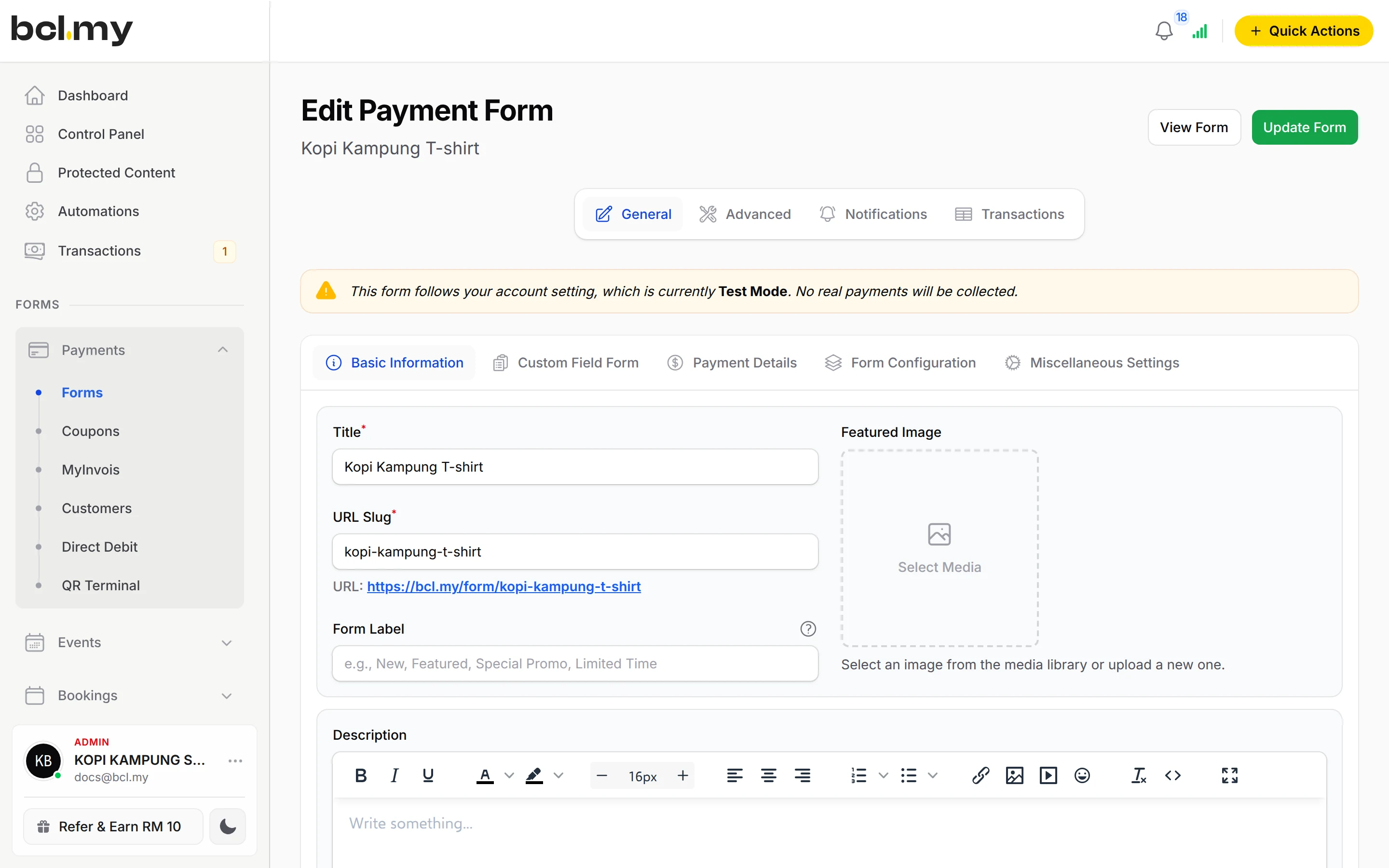
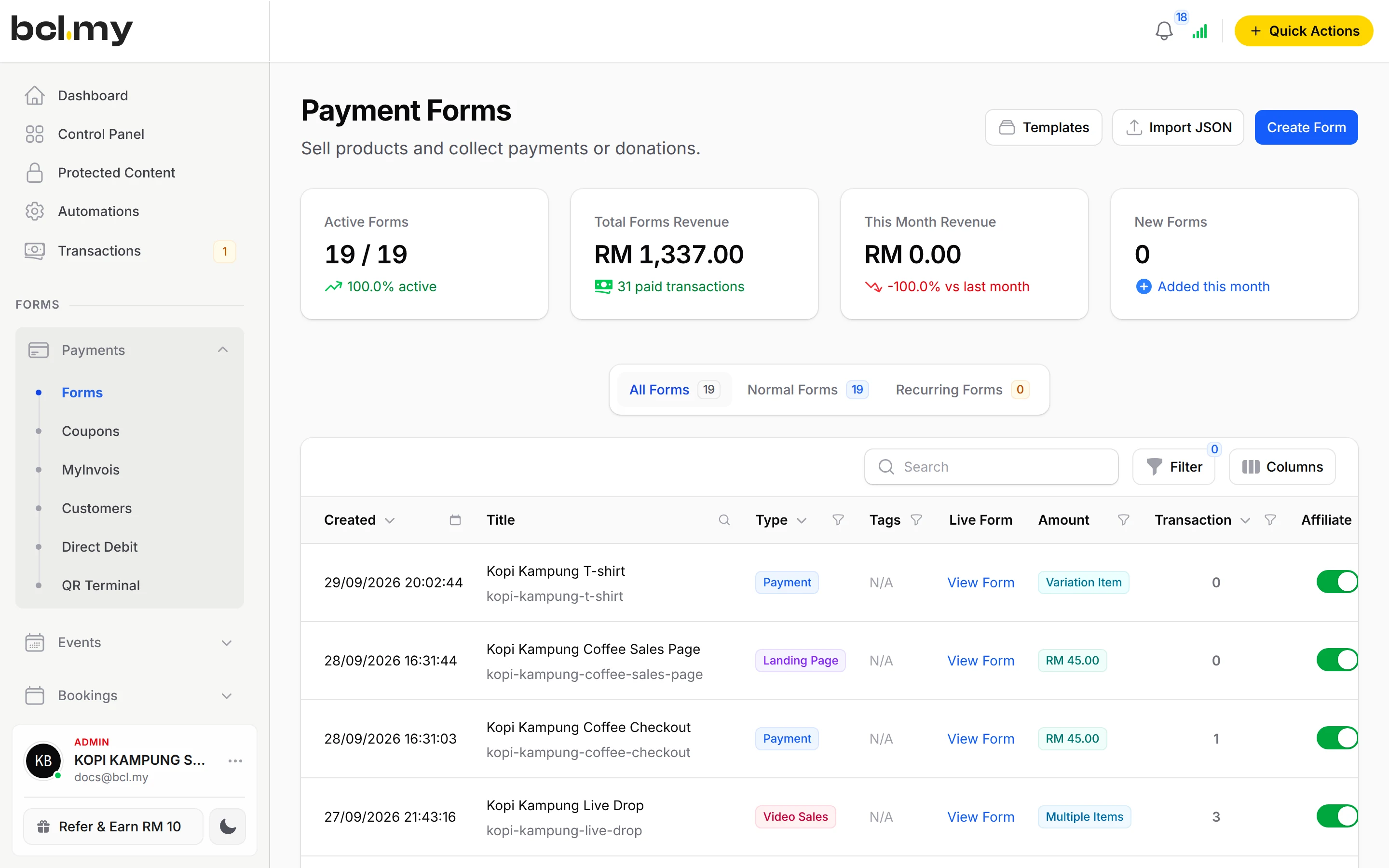

What you get
Stop retyping orders
Your customer picks the item, size and quantity on the form and pays. The order arrives in Transactions with their details, so nothing is copied out of a chat.
Sell out without overselling
Set stock on each item and option. When it is gone, the form says so. Add a close date or a countdown for a pre-order or a Raya batch.
One form, many looks
The same form can be a plain checkout, a donation page with a target, a sales page, a block-built landing page or a full-screen video page.
What you can do
Four ways to price
Single Amount for a fee, Open Amount (User Input) for pay-what-you-want, Multiple Items for up to 50 products, Items with Variations for sizes and colours (6 items x 15 options), each with its own price and stock.
Six types of form
Payment, Donation (with Target Amount, progress bar and countdown), Sales Page, Custom HTML, Landing Pages (block builder in Edit Landing Page) and Video Sales (Beta).
Stock limits and close dates
Give each item a stock count, set Available From and Available Until, and show a countdown to the buyer.
Social Proof and embed
Show recent purchases on the form, or embed the form on your own website.
Two-step funnel
Switch on Use as minisite to show the page with no form, then send buyers from its button to a separate checkout form.
Custom fields
Ask for what you need, such as a size or a school name, with up to 20 custom fields per form.
Templates
Start from a ready-made form such as Clothing / Apparel under Payments > Forms > Templates and edit it.
Used by
Jobs it helps with
Good to know
- Every order is paid in full in one payment. There is no part-payment setting, and no instalments other than BNPL.
- No extra offer box at checkout and no upsell page after payment. List the extra product as another item, or use Redirect After Payment to send buyers to an offer page.
- Multiple Items takes up to 50 items per form; Items with Variations takes 6 items with 15 options each. Split a bigger catalogue over several forms.
- Payment Option only lists the channels Bayarcash has switched on for your portal.
- One custom domain per BCL account.
Questions owners ask
Can I sell clothes with sizes and colours on one form?
Yes. Use Items with Variations: one variation item per design or colour, with the sizes as its options. Each option has its own price and stock, and a customer can buy several designs in one payment.
Can a customer pay part now and the rest later?
Not on one form. Every order is paid in full. Sell the first part as its own item or form, then send a Payment Link for the balance when it is due.
Can I use the form as a sales page for ads?
Yes. Choose Landing Pages, Sales Page or Video Sales (Beta) as the Type of Form. To send ad traffic to a page with no form, switch on Use as minisite and link its button to a separate checkout form.
How do I close the form when I stop selling?
Turn off Enable Form on the form's row in Payments > Forms, or set Available Until on the Form Configuration tab to close it on a date.
Can I start before my Bayarcash account is approved?
Yes. New accounts start in Test Mode, so you can build and try your forms first. Test payments go to the Bayarcash sandbox and nothing is charged. Your forms keep working after you connect Bayarcash.
Which payment methods can my customers use?
FPX online banking and DuitNow QR come as standard. Cards (Visa and Mastercard), e-wallets (Touch 'n Go eWallet, Boost, GrabPay), Buy Now Pay Later (SPayLater, Grab PayLater, Boost PayFlex) and cross-border QR (Singapore, Indonesia, Thailand and China) appear once Bayarcash switches them on for your account. Prices are in RM.
What is BCL, and how does it work with Bayarcash?
BCL is where you build your forms, pages and payment links and see every sale. Bayarcash is the payment gateway behind it: it collects the payment and pays it out to your bank, minus its fee. To take real payments you need an approved Bayarcash merchant account.
Ready when you are.
Build your first form in Test Mode today. Connect Bayarcash when you want real payments.
Create your first form