
Know which ad brought the sale.
Put your pixel on the form, and every visit, checkout and purchase reaches Meta, TikTok, Google Analytics 4 or Google Ads. Server-side sending catches the sales that ad blockers hide.

Trusted by these companies














What you get
Stop guessing which ad works
PageView, ViewContent, InitiateCheckout and Purchase fire on your forms, so your ad platform learns who actually buys.
Sales that ad blockers hide
With the Conversions API or Events API on, BCL's server sends the purchase even when the buyer closes the page before the receipt loads.
Proof in the log
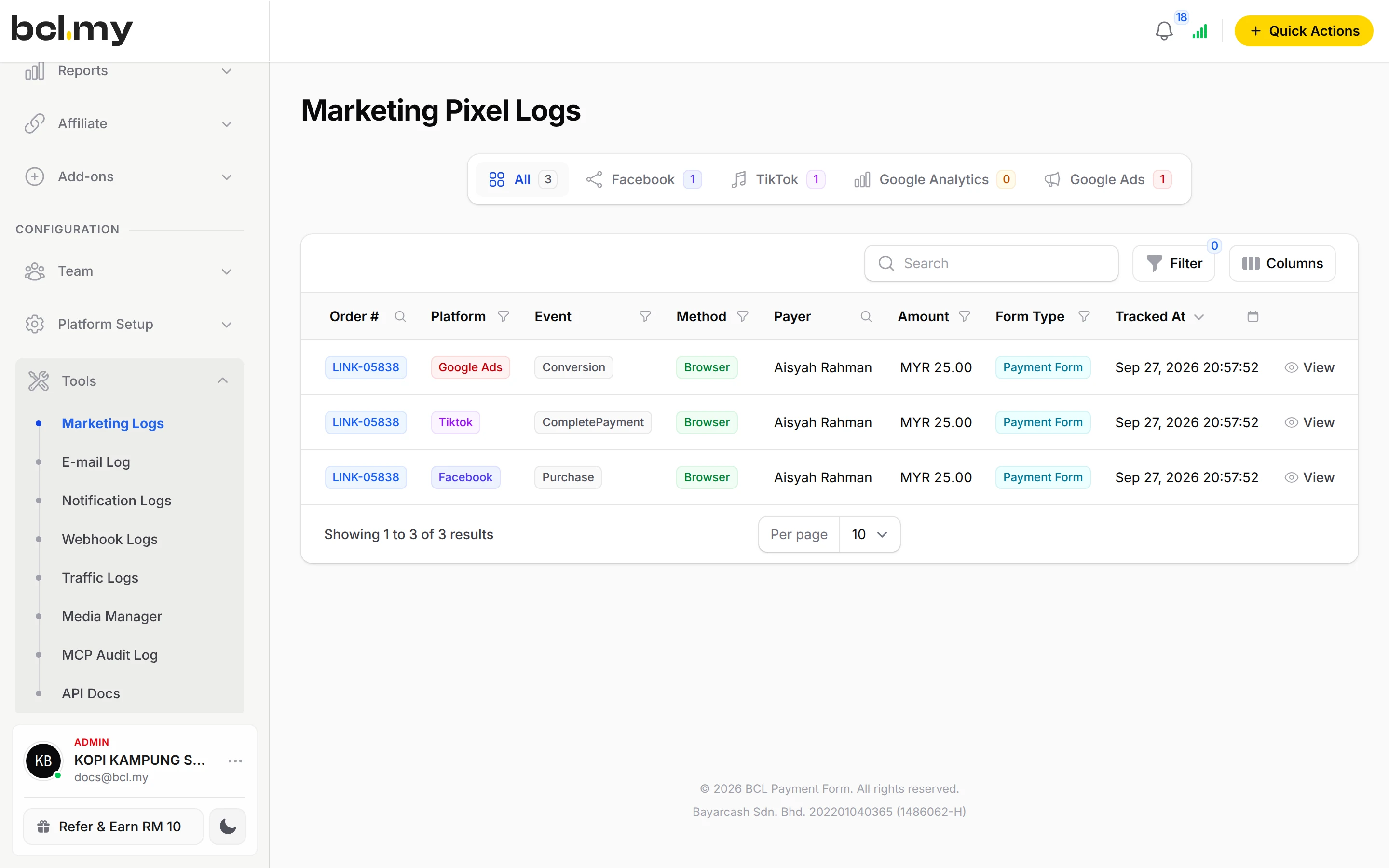
Marketing Pixel Logs shows every purchase sent, to which platform, from Browser or Server, and the platform's reply.
What you can do
Four platforms
Meta (Facebook), TikTok and Google Ads on each form's Advanced tab; Google Analytics 4 once for the account under Platform Setup > Integrations.
Server-side purchases
Enable Facebook Conversions API, Enable TikTok Events API and the GA4 Measurement Protocol. One Purchase per order, matched by event ID.
Payment links too
Pixel Settings under Platform Setup > Link Configuration cover every Payment Link.
COD orders
Trigger Purchase Event on Pending sends the purchase when a COD order is placed, or leave it off and it goes when you approve the order.
Test codes
Paste a Facebook TEST_CODE or TikTok TEST_CODE to see server events in the platform's test tool, then clear it.
Lead forms & minisites
Lead forms send Lead or SubmitForm. A minisite fires PageView and ViewContent, and the checkout form fires the rest.
Used by
Jobs it helps with
Good to know
- Google Ads is browser only; there is no server-side sending for it.
- Failed and cancelled payments are never sent.
- Meta and TikTok show events later than the BCL log. A row in Marketing Pixel Logs means BCL sent it.
- A Browser row is not proof the platform received it. Turn on server-side sending to be sure.
- Pixels need no add-on.
Questions owners ask
Do I still need the pixel if I turn on the Conversions API?
Yes. The Conversions API is switched on inside the pixel settings, and the pixel still tracks visits and checkouts. The API adds a server-side Purchase.
Will Meta count a purchase twice, from the browser and from the server?
No. BCL sends the Purchase once per order, from whichever side comes first, with the same event ID on both sides so Meta can match them.
How do I know if my Meta pixel fired the Purchase event?
Go to Tools > Marketing Logs and open the Facebook tab. Each paid order BCL sent has a row with the event Purchase, and whether it went from Browser or Server.
My COD order did not show as a Purchase in Meta. Why?
Turn on Trigger Purchase Event on Pending on the form's Facebook Pixel tab to send it when the order is placed. Otherwise it is sent when you approve the order, through the Conversions API.
Do I need an add-on?
Not to start. Payment forms, payment links, coupons and transactions need no add-on. Add-ons unlock Event Management, Lead Forms, OTP-Protected Content, COD & Manual Transfer, LHDN E-Invoice and Courier Integration. Each is monthly or yearly, renewals are invoiced (never auto-charged), and you can cancel yourself.
Can I start before my Bayarcash account is approved?
Yes. New accounts start in Test Mode, so you can build and try your forms first. Test payments go to the Bayarcash sandbox and nothing is charged. Your forms keep working after you connect Bayarcash.
Ready when you are.
Build your first form in Test Mode today. Connect Bayarcash when you want real payments.
Create your first form