
Send LHDN e-invoices from your sales.
BCL submits your e-invoices to LHDN MyInvois through Bayarcash as your intermediary, and shows you any that need fixing. Needs the LHDN E-Invoice add-on.
Made for Malaysia's micro SMEs.

What e-invoicing means for you
An e-invoice is a digital invoice that LHDN checks and records in its MyInvois system.
Instead of keeping invoices only in your own files, each one is sent to LHDN, which validates it. Whether and when you must send e-invoices depends on LHDN's rules for your business, so check the latest guidance from LHDN.
If you do send them, BCL can do it from the sales you already take on your forms, without typing each invoice again.
How BCL submits through Bayarcash
You give permission once in the MyInvois Portal, then BCL does the sending.
-
Subscribe to the add-on
Turn on the LHDN E-Invoice add-on in Add-ons > Available Add-ons.
Add-onsAvailable Add-onsLHDN E-Invoice -
Fill in your company details
In Team > Company Profile, add your details and your Tax Identification Number (TIN). The E-Invoice Compliance box lists anything still missing.
Company ProfileTax Identification Number (TIN)E-Invoice Compliance -
Add Bayarcash as your intermediary
In the MyInvois Portal on LHDN's site, add Bayarcash as an intermediary with permission to submit documents for you.
-
Check the connection
Back in Company Profile, click Check Connection and look for Connection Verified. Your e-invoices then show under Payments > MyInvois.
Check ConnectionConnection VerifiedMyInvois
Sent to MyInvois for you
BCL submits your e-invoices to MyInvois automatically. It is on by default, so you do not key in each sale again.
Every submission and its status is listed under Payments > MyInvois, so you can see what LHDN has accepted and what failed.
Get your buyers' details without chasing
An e-invoice in a buyer's name needs their TIN, ID number and address.
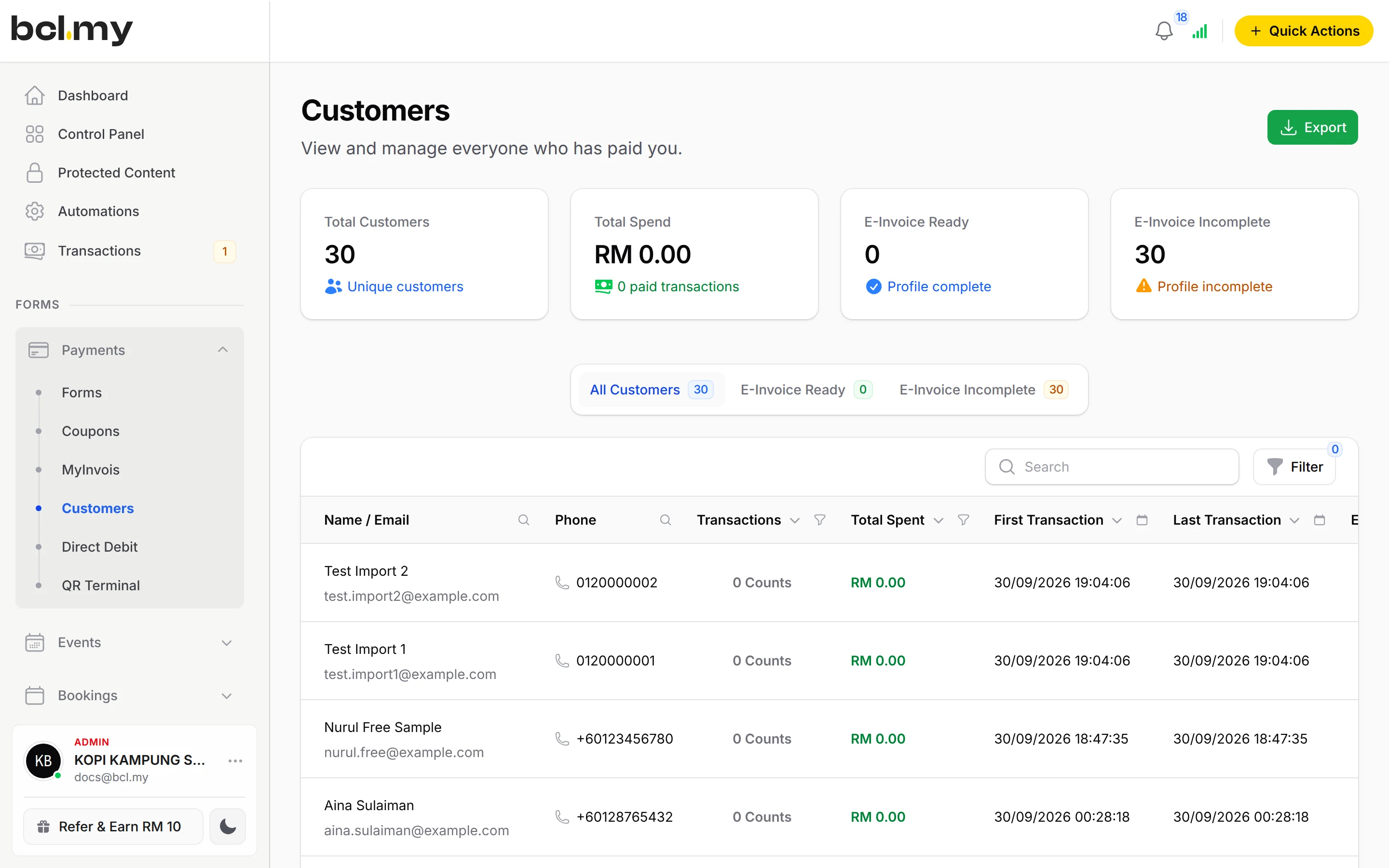
When a customer's details are missing, use Request Customer Data on the e-invoice to ask them, or Update Customer Data to fill them in yourself. The Customers page shows who is E-Invoice Ready.
Buyers can also keep the address used on their e-invoices up to date in the Customer Portal.
Your buyers can also ask for an e-invoice themselves, from the link on their receipt.
Fix a failed e-invoice
When LHDN rejects an e-invoice, BCL keeps it under Payments > MyInvois with the reason.
- Open Payments > MyInvois and the Failed tab to see each failed e-invoice and why.
- Common causes: Bayarcash not yet set as your intermediary, a wrong TIN or company detail, or missing customer details.
- Fix the cause, then press Submit E-Invoice once. The same e-invoice sent again unchanged within 10 minutes is refused as a duplicate.
- Missing customer details? Use Request Customer Data to ask your customer for them.
Needs the LHDN E-Invoice add-on
E-invoicing is an add-on, paid monthly or yearly per account. Renewals are invoiced and never auto-charged, and you can cancel it yourself in Add-ons.
Questions owners ask
Does BCL handle LHDN e-invoices?
Yes, with the LHDN E-Invoice add-on. BCL submits your e-invoices to MyInvois through Bayarcash as your intermediary, and lists any that fail so you can fix them.
Why does BCL need Bayarcash as my intermediary?
LHDN only accepts e-invoices sent on your behalf by someone you have authorised. Adding Bayarcash as your intermediary in the MyInvois Portal lets BCL submit through Bayarcash for your TIN.
Check Connection says Authorization Required. What now?
LHDN has not authorised Bayarcash for your TIN yet. Add Bayarcash as an intermediary in the MyInvois Portal, under the same company as the TIN in Company Profile, then click Recheck Connection.
I pressed Submit many times and now it says duplicate.
LHDN refuses the same e-invoice sent again within 10 minutes, so the duplicate message is a result, not the cause. Open the e-invoice under Payments > MyInvois, read why the first attempt failed, fix that, then submit once.
Do I need an add-on?
Not to start. Payment forms, payment links, coupons and transactions need no add-on. Add-ons unlock Event Management, Lead Forms, OTP-Protected Content, COD & Manual Transfer, LHDN E-Invoice and Courier Integration. Each is monthly or yearly, renewals are invoiced (never auto-charged), and you can cancel yourself.
What is BCL, and how does it work with Bayarcash?
BCL is where you build your forms, pages and payment links and see every sale. Bayarcash is the payment gateway behind it: it collects the payment and pays it out to your bank, minus its fee. To take real payments you need an approved Bayarcash merchant account.
Ready when you are.
Build your first form in Test Mode today. Connect Bayarcash when you want real payments.
Create your first form