
From paid to posted.
Charge the right delivery rate at checkout, then create the shipment from the order and keep the tracking number on it. Shipping rates need no add-on; couriers need the Courier Integration add-on.
Made for Malaysia's micro SMEs.

What you get
The right charge, every time
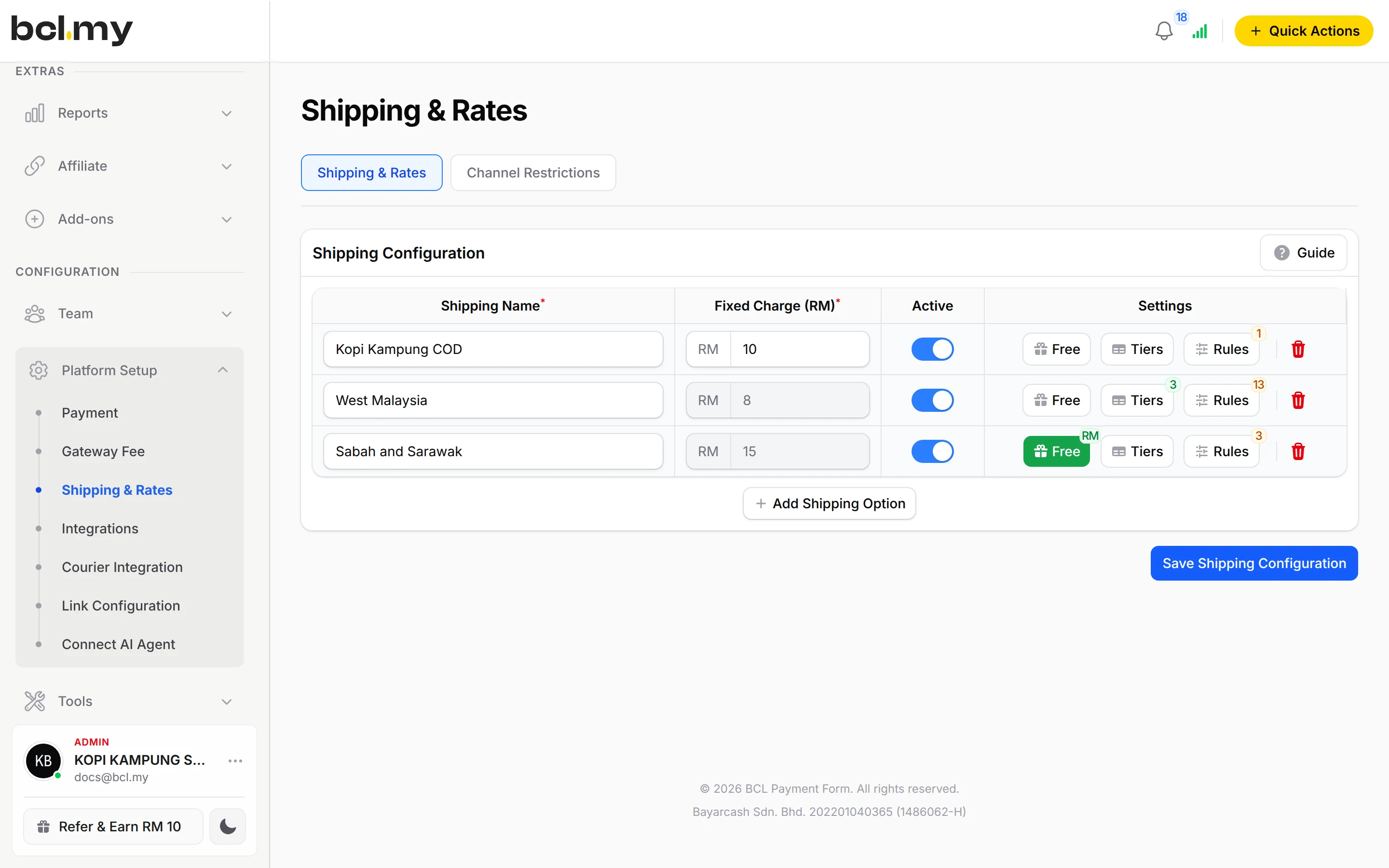
A flat rate, tiers by weight or quantity, a different rate for Sabah and Sarawak, or free shipping above a spend. With Rules (COD & Manual Transfer add-on), each customer sees only the options for their state.
No retyping addresses
Click the truck icon on an order, pick the courier service and rate, and the tracking number is saved on the order. Print the waybill from the same window.
COD and shipping together
Add a charge that shows only for COD orders, and see which courier services can collect the cash.
What you can do
Up to 6 shipping options
Each with a Fixed Charge (RM), or Tiers that are Weight-based (kg) or Quantity-based (units), up to 20 tiers.
Free shipping rules
Always Free, Minimum Order Value or Minimum Items, with a Validity Period for a promotion.
Region rules
Limit an option to certain States/Cities, or to Malaysia, Singapore or Indonesia under Countries. Rules need the COD & Manual Transfer add-on.
Five couriers
EasyParcel, Ninja Van, Pos Malaysia, MyParcel Asia and Parcel Daily, connected under Platform Setup > Courier Integration. Needs the Courier Integration add-on.
Shipments from Transactions
Compare EasyParcel rates per order, or use Bulk Ninja Van for many orders at once. View Airway Bill and Track Shipment from the order.
Tracking updates to the customer
An automation can email the customer the courier and tracking number when the shipment is created.
Good to know
- Needs the Courier Integration add-on.
- Shipping rates need no add-on. Creating shipments with a courier needs the Courier Integration add-on. Limiting a rate to certain states (Rules) needs the COD & Manual Transfer add-on.
- A weight-based option cannot be chosen while the order's total weight is 0 kg. Every physical item needs a Weight.
- Shipping rates follow the state, not the postcode.
- EasyParcel charges shipments to your EasyParcel credit, and there is no bulk print for EasyParcel waybills.
- A Ninja Van shipment needs item weights and a delivery address in Malaysia.
Questions owners ask
How do I charge one rate for Peninsular Malaysia and another for Sabah and Sarawak?
Add two shipping options, then click Rules on each one and choose its states in States/Cities. Rules need the COD & Manual Transfer add-on; without it, customers see both options and pick one themselves.
Can shipping be free above a certain spend?
Yes. Click Free on the shipping option, turn on Enable Free Shipping, choose Minimum Order Value and enter the amount. Orders below it still pay the option's charge.
Why don't I see the courier option on an order?
It shows only when the courier is enabled under Courier Integration, the Courier Integration add-on is active, and the order has items and a full delivery address.
How do I print the waybill?
In Transactions, click the green truck icon on the order, choose the courier, then click View Airway Bill. Print it from your browser or save it as a PDF.
Do I need an add-on?
Not to start. Payment forms, payment links, coupons and transactions need no add-on. Add-ons unlock Event Management, Lead Forms, OTP-Protected Content, COD & Manual Transfer, LHDN E-Invoice and Courier Integration. Each is monthly or yearly, renewals are invoiced (never auto-charged), and you can cancel yourself.
Can I start before my Bayarcash account is approved?
Yes. New accounts start in Test Mode, so you can build and try your forms first. Test payments go to the Bayarcash sandbox and nothing is charged. Your forms keep working after you connect Bayarcash.
Ready when you are.
Build your first form in Test Mode today. Connect Bayarcash when you want real payments.
Create your first form